May 1, 2011
Three new social media features have been added to the profile form on NJSCPA Connect:
1. Import Profile Info from LinkedIn
This link will allow you to pull certain information from your LinkedIn profile into your Connect profile. You will be presented with a grid that shows your picture, bio, job history and education info from LinkedIn and Connect and give you the option to pull each of those items from LinkedIn to Connect. If the data already matches exactly, that will be indicated (as you can see with the job history and education info below).
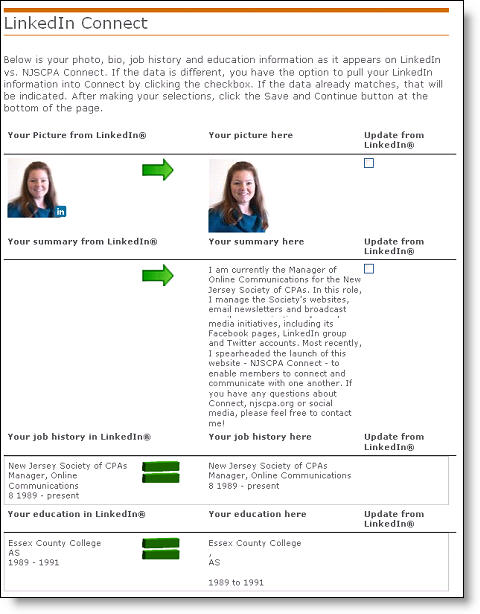
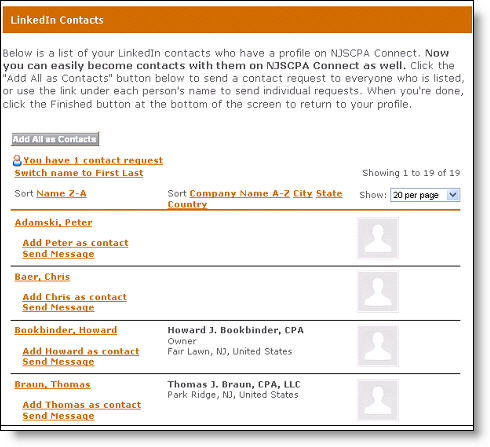
Upon clicking the Save and Continue button at the bottom of the page, you’ll be taken to a page that lists all of your LinkedIn contacts who also have a profile on NJSCPA Connect – so that you can send them a Connect contact request if you want to:
2. Social Media Links
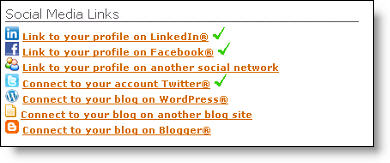
You can provide links to your profiles on various other social media sites, including LinkedIn, Facebook and Twitter. Click each item that you’d like to provide a link to, and enter the full URL of your profile on that site (such as http://www.linkedin.com/in/yourname)
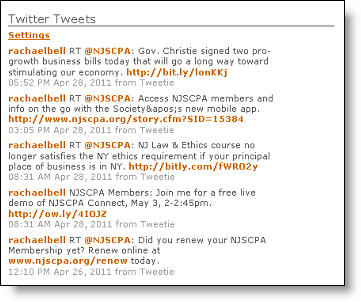
3. Twitter Tweets
You have the option to display your recent tweets on Twitter directly on your Connect profile. Click the “Share your tweets from Twitter” link and enter the full URL of your Twitter profile (such as http://www.twitter.com/yourhandle), not just your Twitter handle.
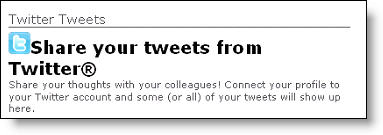
When you’re done, there may be a slight delay before the site initially displays your Tweets. Once it’s in place, it’ll look something like this:
If you have any questions about these new features, contact Rachael Bell at rbell@njscpa.org or 973-226-4494 x220.